If your YouTube Short comes from a podcast or tutorial, an AI clipping tool can find a complete answer, crop it for a phone, and add captions. If you have a script but no footage, use a tool that can build the scenes. The first decision is what the viewer must see. A face can stay perfectly centered while the button someone presses disappears off the edge.
Choose your starting material
Start from an existing recording when the main appeal is something that actually happened. That could be an interview answer, a before-and-after, or a tricky technique you captured clearly. Tell the tool what the viewer should learn and where that moment lives if you know the timestamp. A highlight finder can get you to candidate sections quickly. You should still watch a little before and after each selection. A good answer can sound wrong if the clip starts after the speaker states an important condition.
Start from a brief when the story can be told with scenes you can prepare. A small explanation can use a drawn diagram, a few product shots, and a short voice-over. Write the action beside the narration so that the pictures do some of the explaining. For a Short showing a real interface, make a recording of that interface even if an agent prepares the graphics around it. Decide which visuals someone needs to verify before you give the tool room to add more.
| Your starting point | Ask for this first | Watch for this in the draft | Try this before posting |
|---|---|---|---|
| Full interview | One complete answer with enough of the question | Cuts that leave a name or qualification out | Check names and numbers against the audio when you review YouTube’s automatic captions. |
| Recorded tutorial | A moment that shows the action followed by the result | The cursor, gauge, or label falling outside the frame | Watch the exact moment the important number, control, or cursor moves. |
| Script or outline | A clear opening, a visual for each idea, and a short end | Unrelated stock or invented product details | Check YouTube’s disclosure rules for generated scenes that could be mistaken for footage. |
| Several vertical takes | A sequence that keeps the strongest action | Jumps in position, sound, or continuity | Check that the export meets the YouTube Shorts format and length requirements for a vertical or square video up to three minutes long. |
What to ask the tool to do
For recorded footage, describe the moment in terms the editor can locate. “Keep the shot where the thermometer reads 82°C. Frame the entire display and leave it on screen long enough to read.” For a spoken explanation, include the line that tells the viewer what the number means. A highlights request alone gives the editor little reason to keep that detail.
For a script, write the action beside the line of narration. A cable-wrapping tip, for instance, needs a shot of the wrap and a close-up of where the loose end goes. OpusClip can find and reframe clips in a recording. Agent Opus can start from an outline. Pexo’s YouTube Shorts generator takes a written brief and builds a vertical 9:16 draft with narration.
What a center crop leaves out
We made a landscape clip from a generated photo of a digital thermometer. The display sits on the right. Both frame grabs below come from 540 × 960 exports of that clip. The center crop keeps mostly workbench. Move the crop right and you can read all of 82°C.
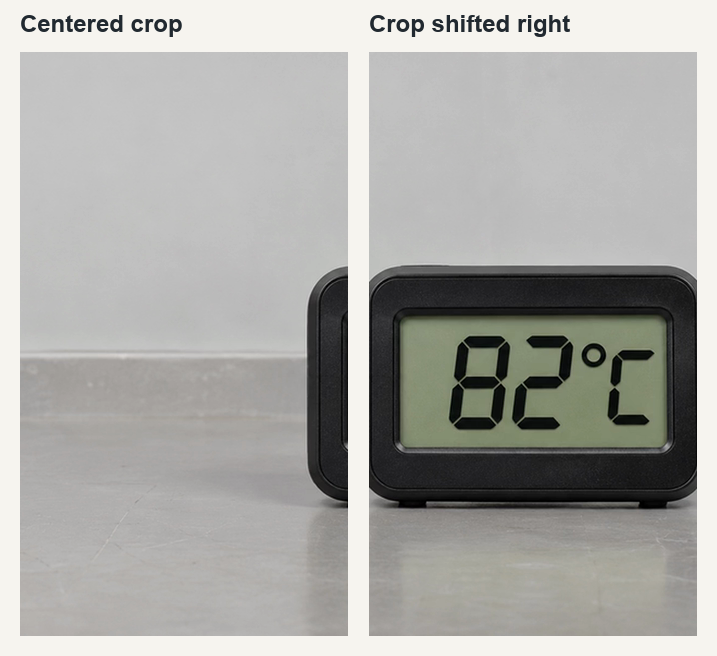
Check the frame where the information appears. In a tutorial the camera may start on a face and then move to a pair of hands. If an automatic crop keeps following the face, shift the framing for the demonstration or cut to a close-up. Play the crop that keeps the reading visible
Make the selection work as a standalone video
A good short clip can begin after the small talk, but it still needs a clear subject. Somebody who never saw the full video should know what “it” refers to. Keep the one line that provides the context or add a short introduction you can support from the source. For a tutorial, leave enough time for cause and effect. If the agent cuts away right before the display settles, the Short can technically include the right footage while making the action hard to learn.
Check any claims that were narrowed or shortened. A segment that says a setting works “on this particular model” should keep that qualifier. A before-and-after needs consistent context so the difference is credible. For a short made from scratch, give each shot a job. Remove a pretty shot if the voice-over and visuals already make the point without it. Keep a quiet beat if the viewer needs time to read a result.
Check captions, length, and music before uploading
Under YouTube’s Shorts eligibility rules, qualifying vertical or square uploads can be up to three minutes long. For a Short longer than one minute, an active Content ID claim blocks playback worldwide. This matters if the long video you are cutting has a music bed. Check the audio you are keeping before you spend time on the vertical edit.
When reviewing captions, check names, numbers, and the timing of each cue. If a caption is burned into the frame, think about whether you can replace it quickly when you spot a typo. Keep captions separate too if the workflow allows and you want an independent subtitle file. For synthetic scenes that look real or meaningful changes to real footage, check YouTube’s AI disclosure examples while preparing the upload.
Fix the framing where the action changes
Mark the important object before rendering the whole clip. A cooking demonstration might start on the person speaking, then move to a spoon, a bowl, and the final texture. Give the tool a place in the source for each action. Ask it to keep the bowl in view during the pour even if the face is nearer the center. If it can change the crop over time, make those changes near a natural cut. A sudden jump in framing halfway through a hand movement can be harder to follow than a static, slightly wider shot.
There are several acceptable ways to preserve a wide shot. You can zoom into the important region for a moment, keep the whole landscape shot within the vertical canvas, or show a close-up afterward. Play the alternatives on a phone. The wide frame can make a small display unreadable. A tight crop can hide the hand that caused the result. Use the view that shows enough of both. If the source never captured the result clearly, reshoot that piece or use a clearly labeled diagram instead of trying to make the crop prove something it never showed.
Save the file you approved
Keep a source link, the approved cut, and the latest caption file if you have one. If the title or end card changes, give the revised render a new name. Check that the export you select for upload is the one you just watched. This matters when an agent makes several plausible candidates, including an early draft with different text. The version people approve in a chat can be a different file from the one the tool picked up in a folder.
If a description or pinned text gives important context, prepare it while reviewing the cut. You can mention when a demo was filmed or point back to the longer discussion. Keep anything essential to understanding the Short inside the Short. A viewer who only watches the clip still needs enough information to follow the claim or action.
If the tool regularly picks the right answer but crops out the demonstration, keep its clip selections and adjust the frame yourself. If you expect another round of revisions, check whether the editing agent returns a timeline you can reopen before you export.
Frequently asked questions
Can an AI agent make YouTube Shorts from an existing video?
Yes. A clipping tool can suggest segments, reframe them for vertical playback, and add captions. Check that each Short makes sense by itself and retains the important part of the frame.
Do I need original footage to make a Short?
You can work from a script using graphics, licensed clips, or generated material. Use your own recording where it is needed to show a real product, person, result, or process accurately.
How long can a YouTube Short be?
YouTube currently classifies eligible square or vertical uploads as Shorts up to three minutes. Use the time a particular idea needs and check YouTube’s rules before uploading.
Can I approve the crop without rewatching the whole Short?
Review the full export at phone size. A subject can move out of frame later, and captions or labels can become unreadable even when the opening frame looks good.
When should I disclose AI use on YouTube?
Follow YouTube’s disclosure guidance for realistic AI-generated or meaningfully altered content. The ordinary use of AI to draft a title or create captions is among the examples YouTube lists as generally not requiring disclosure.